How to Program a Garage Door Remote or Keypad
On almost every modern opener you program a remote by pressing the Learn button on the motor unit, then pressing the remote button within 30 seconds until the opener light flashes or you hear a click. The Learn button is on the back or side of the motor unit, usually under the light cover, and it is colored. The color tells you the frequency and the generation, which is what you need when buying a replacement remote. If no remote will program and the wall button still works, the receiver has failed, and opener repair is $95 to $300.
Programming a remote takes two minutes once you know where the button is. Most of the people who call us about it have been standing at the wall control pressing things, and the button they need is on the ceiling. This is how it works on every common brand, what the Florida climate does to keypads and openers, and how to tell a programming problem from a dead receiver.
What you are actually doing
Every opener has a receiver that stores a list of remotes it trusts. Programming a remote means putting a new entry on that list. Erasing means clearing the list.
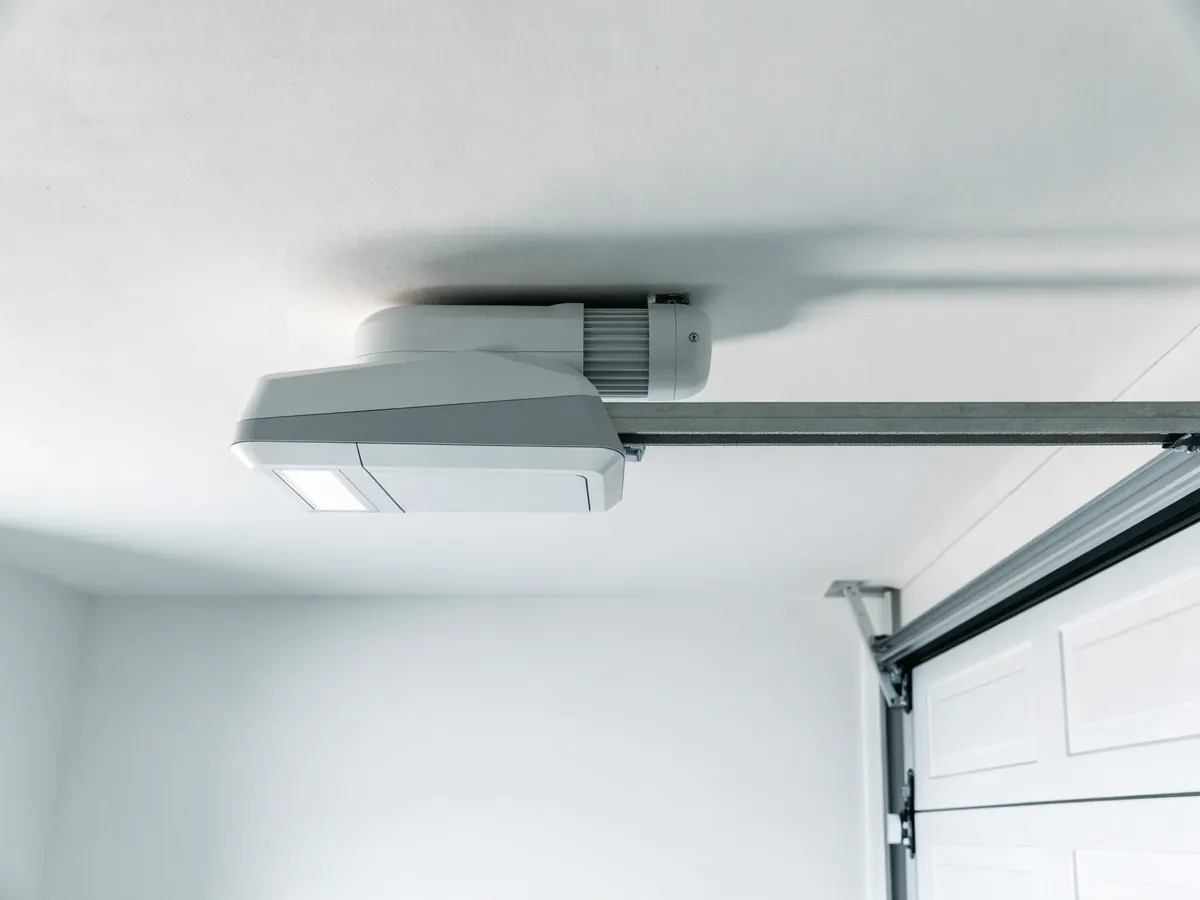
The button that controls this lives on the motor unit hanging from your garage ceiling, not on the wall control.
You will need a ladder and a flashlight.
Find the Learn button
Look on the back or the side of the motor unit. On most LiftMaster and Chamberlain units it is under or behind the light lens cover, which unclips. On some models it sits behind a small hinged panel. There is usually a short antenna wire dangling near it, which is a good landmark.
It is a small square button, and it is colored. Note the color before you touch it, because on LiftMaster and Chamberlain it tells you exactly which remotes will work:
| Learn button color | What it means |
|---|---|
| Green, red or orange | Older 315 MHz, billion code generation |
| Purple | 315 MHz rolling code |
| Yellow | Current Security+ 2.0, 315 and 390 MHz |
When you buy a replacement remote, match that color and it will work. Ignore the color and you will be returning it.
Genie, Overhead Door, Wayne Dalton and Linear all have an equivalent button, usually labeled Learn, Program or Set, though it is not always color coded in the same way.
Programming a remote
The sequence is nearly identical across modern brands.
- Press and release the Learn button. Do not hold it. An LED next to it will light or start blinking.
- Within about 30 seconds, press the button on the remote you want to add.
- The opener light will flash, or the unit will click, or the LED will go out. That is the confirmation.
- Test it.
If nothing happens within 30 seconds the opener drops out of learn mode and you start again.
The one thing that goes wrong. Holding the Learn button for six seconds or more does not program anything. It erases every remote and keypad stored in the opener. If you have done that, nothing is broken, but you now have to reprogram every remote and every keypad in the house. Press and release. Do not hold.
Programming a keypad
The outside keypad follows the same idea with one extra step: you choose the code first.
- On the keypad, enter the four digit PIN you want, then press Enter. Some models want you to hold Enter, and some older ones use a program button instead.
- Press and release the Learn button on the motor unit.
- Within 30 seconds, enter your PIN on the keypad and press Enter again.
- The opener light flashes or clicks. Test it.
Keypads in Florida. An outdoor keypad on a west facing garage wall spends every summer afternoon in direct sun at well over 120°F on the case, and every summer evening in a thunderstorm. That combination kills batteries and lets moisture into the contacts. If a keypad worked in the spring and stopped in August, put a fresh battery in it before you assume a programming problem, and if the buttons have gone stiff, the humidity has got into it. A keypad that has been through a few summers is a cheap part to replace.
Programming the buttons in your car
The buttons in the rearview mirror or overhead console are made by HomeLink or Car2U, and they are the fiddliest part of this whole subject because the car has to learn the remote, then the opener has to learn the car.
- Clear the button. Hold the two outer buttons on the car unit for about 20 seconds until the indicator flashes rapidly. Do this once when the car is new to you, not every time.
- Teach the car your remote. Hold your working handheld remote one to three inches from the car button and press both at the same time. Hold until the car indicator changes from a slow flash to a rapid flash. This can take up to a minute and some remotes need you to release and re-press the remote button repeatedly during it.
- Teach the opener the car. Press and release the Learn button on the motor unit, then within 30 seconds press the programmed car button. On some cars you have to press it up to three times.
If your opener is rolling code and the car is older, step three is where it fails, and you may need a HomeLink bridge or repeater to make them talk. That is a real product and not an upsell invented by the dealership.
Some vehicles also need the ignition on and the engine off during programming.
When it will not program
Work through these in order.
Fresh battery in the remote. A remote with a weak battery often still lights its LED while lacking the power to transmit properly. A remote that lives in a car parked in the sun all day in Florida goes through batteries faster than the packaging suggests.
Are you sure you found the Learn button and not the light button? They sit close together on some models.
Did you hold instead of press? If so you have wiped the memory. Reprogram everything.
Is the remote the right generation? Check it against the Learn button color table above. A Security+ 2.0 opener will not learn an old billion code remote, no matter how many times you try.
Did a storm take the receiver? Florida gets more lightning than any other state, and a surge through the power line or through the wall control wiring kills logic boards. The usual pattern is that the door worked fine before the storm, and afterward no remote programs, or the wall button works but nothing else does. If no remote will program, including one you know works, and the wall control still operates the door normally, the radio receiver has failed. On most units that means a logic board. Opener repair is $95 to $300, and on an opener over fifteen years old that price is worth weighing against a new unit. A surge protector on the opener outlet is cheap insurance, and our guide on an opener that quits working covers the surge case.
Security housekeeping while you are up there
One thing worth doing while the ladder is out.
Erase everything if you have just moved. Florida has a lot of moves, and you have no idea how many remotes the previous owner handed out over the years, or which cleaners, landscapers and pool companies still have one. Hold Learn for six seconds, wipe the lot, and reprogram only the remotes you hold in your hand. This takes ten minutes and it is the single best security action available to a new homeowner. Our guide on garage door locks and security has the rest.
When this is not a programming problem
If the door responds to the wall button but nothing else, that is a receiver or remote fault and the steps above apply. Our guide on a garage door remote that is not working goes deeper.
If the door does not respond to anything, or moves and reverses, or opens but will not close, that is not a programming problem at all. Look at our guides on why a garage door will not close and what a flashing opener light means.
What we charge
Programming is not something we would normally send a van out for on its own, and we would rather you did it yourself with the steps above than paid anyone for it.
If a remote genuinely will not program because the receiver has failed, opener repair is $95 to $300. Opener installation is $275 to $600, and a smart opener with battery backup is $350 to $750, which is worth considering here because the phone app replaces the remote and the battery backup gets you out during a power outage. We do this work across the state, from Broward County to Central Florida.
Every price on this site is a starting price for a standard single door, and you get a written estimate before any work begins. The full list is on our prices page.
Related questions
Where is the Learn button on my garage door opener?
On the motor unit itself, not on the wall control. Look on the back or the side, usually behind or under the light lens cover, sometimes under a small panel with an antenna wire hanging nearby. You will need a ladder. It is a small colored square button, often next to an LED.
What does the color of the Learn button mean?
On LiftMaster and Chamberlain it identifies the generation and frequency. Green, red or orange indicates an older 315 MHz billion code unit. Purple indicates 315 MHz rolling code. Yellow indicates the current 315 and 390 MHz Security+ 2.0 range. Match the color when buying a replacement remote and it will work.
Are garage door remotes universal?
Universal remotes exist and many work well, but universal means it supports many brands and frequencies rather than all of them automatically. Check the packaging against your opener brand and the Learn button color before buying. A universal remote that does not cover Security+ 2.0 will not work on a yellow button opener.
Did the power outage erase my remotes?
No. The opener stores remotes in memory that survives an outage, so a door that ignores the remote after a storm has a different problem. Check the remote battery, then check whether the wall button works. If nothing works, the logic board may have taken a lightning surge, which is common in Florida. If only the remote fails, it is usually the battery or the receiver.
My remote will not program. What now?
Try a fresh battery first, then check you are pressing Learn once rather than holding it, since holding it for six seconds erases every remote instead of adding one. If you have erased them, reprogram every remote and keypad in the house. If it still fails after that, the remote or the opener receiver has failed.